
Tools for Bloggers That Will Pay for Themselves
Which tools for bloggers are worth paying for? Which will earn you more money or save you lots of time?

As a travel blogger or publisher, you could easily spend four or five times the amount of revenue you’ve got coming in on the services people are trying to pitch to you. I run five content websites and a few that are static sales sites, however, and I’ve found that a whole lot of them are overpriced or too complicated for what you really need. It’s not the price that matters though for which tools for bloggers are worth paying for. It’s that key business term “return on investment,” or ROI.
By most accounts, I am objectively a successful travel publisher. I’ve been full-time since 2006, supporting a family and putting a kid through college with my travel writing and blogging. I easily gross six figures each year from my writing, books, and blogs. As you might expect from the guy who runs the Cheapest Destinations Blog though, I hate wasting money. Investing in the business, yes, but throwing money at a problem to a greater extent than needed? That makes me grumpy.
So I’m sharing the useful blogger tools and services I’ve found are worth the money for me. I’m picky about what I’ll pay for, so I’ll also mention a few other services that colleagues use and swear by.
I will probably update this every year or two because there are always new ones coming out. The newest category of tools will even write marketing copy or whole articles for you. Well, the first draft anyway. Check out Hypotenuse AI to see what I mean.
Free (and Freemium) Tools for Bloggers That Will Help Your Business
The best price of all is free of course, as long as you realize that you sometimes get what you pay for. Or sometimes the free version is basically a trial version. If you signed up for my Travel Writing Success newsletter, you got a rundown on the 10 free tools I use the most. If not, you can get it here.
Some of the most popular and useful tools for bloggers won’t cost you anything if you don’t put too many demands on them. Most operate on a “freemium” model where you pay nothing for the basics, then more to get advanced features.
You probably use some of these already: Canva for graphics creation, Cloudflare for international content serving, some kind of social sharing plug-in, an image reduction plug-in, and an SEO plug-in such as Rankmath, Yoast, or All-in-one SEO. These all work fine out of the box and will get you 90% of the way there for what you need.
The only thing you might invest more in for the free version is time: the advanced features can save you a lot of that sometimes. For example, the Pro version of Canva that I pay for gives me more templates, photos, and fonts to access and I can resize my graphic for different situations with a click or two. Rankmath’s premium version allows you to do a quick check if you’re missing some keywords in your article that could be added and tells you how the length of your article compares to ones that are already ranking.
I also have a premium subscription with Dropbox because I got tired of running into storage limits with Google and others and I do a lot of file sharing with people who work with and for me. I also back up all my blogs to there using Updraft Plus so I can sleep better at night. I also back up my cell phone photos to there so I always have access to them from my desktop to use in an article or on social.
There are also free job boards to pick up writing gigs, free productivity tools like Boomerang or FollowUpThen, and there’s SOS Media Queries to get alerted about journalist requests that you may be able to respond to and get quoted. There’s another called Qwoted but the free version only lets you respond to a measly 2 requests a month. After that you have to pay a hefty amount that’s hard to justify.
There are even free keyword research tools out there, including the ones that Google supplies itself and freebies like AnswerThePublic, UberSuggest, and the one with my favorite name: keywordshitter.com.
Podcasts are free and you can learn some great tips that will move your business forward from the right ones. There are podcasts on running niche websites, on travel writing, and ones for location-independent entrepreneurs. There are also free advice newsletters just for travel writers/bloggers such as the one I send out monthly and This Week in Blogging. There are Facebook groups for aspiring and advanced travel bloggers where you can get advice and get questions answered.
I’d guess that most newbies and even a lot of travel bloggers who have been at this for years will stick to these free tools. Some of them probably reach a nice level of success without going beyond what’s free. If you want to step up to that top 20% though and make the kind of living that white-collar cubicle workers do, while spending a lot less time compensating for what you’re not getting in the free versions, you’ll have to invest in some more advanced blogger tools to step up your business.
Some tools are so cheap that it’s dumb not to use them. I have a family plan at LastPass that remembers all our passwords and lets me share mine with a VA without her seeing the actual password. If you want to shop around, check out 1Password as well.
Paid SEO Blogging Tools With a Solid ROI

When it comes to expenses that are relatively easy to justify, SEO tools are at the top of the list. After all, if you’re on an ad network earning you $15 per 1,000 visitors to use an easy math figure, then getting 5,000 more visitors in a month can directly up your revenue by $75. That doesn’t count additional gains from affiliate sales, e-mail sign-ups, or higher domain authority from more people linking to you. Up your visitors by 15,000 per month and you’ve easily paid for one of the premium keyword research services.
I get some free reports from the most popular option, Ahrefs, and I’ve signed up for a month before to go on a mad research binge. I have trouble justifying the high price tags of that or SEMRush, however, because I really don’t have time to dive into all the advanced features they offer. It’s quite a rabbit hole to go down and every hour I spend doing that is an hour I’m not spending doing my real job: creating content. I run five websites though. People who only run one or two often feel differently if they’re getting 50K, 100K, or more visitors per month.
Instead I have been using Keysearch for years. It gets me the info I need in a relatively quick amount of time and I’ve seen solid results from using it. Pricing starts at $17 per month, but you can get a discount if you’re a member of SATW or some other organizations.
A service I used to pay for is the pro version of Rankmath. Their free SEO plug-in is the best one out there, in my opinion, but the Pro version does some of what RankIQ, SurferSEO, Frase, and Muse do: compare your posts to what is already ranking and pointing out any missing keyword phrases. It will suggest length, number of subheads, keyword frequency, etc. I’m not seeing much evidence that’s working so well anymore though, especially in the post-HCU world, so I’m back on the free version.
One aspect of SEO that too many bloggers ignore is internal linking. Once you get up into hundreds or thousands of posts, it’s hard to do it manually in any kind of systemic way. LinkWhisper is a great WordPress plug-in tool for that, helping you build both links from your new posts and to them as well from related ones. It’s currently $77 annually for a one-site license, under $150 for three sites.
Paid Scheduling and Productivity Tools for Bloggers

Unsplash photo by Yi Liu
The ideal tool you add to your travel blogging toolbox is one that easily pays for itself by increasing revenue or decreasing the amount of time you have to spend on non-creative work. Anything that allows you to spend more time on projects that move you forward and earn more revenue instead of spending time on tasks with no leverage is a worthy investment.
Be honest in your assessment though. Will an Instagram scheduling tool really earn you more money if you only post a few times a month anyway and Instagram is not sending any traffic?
I’m a bit frugal at heart, so I only pay for the tools that have a proven ROI for me in terms of time saved or additional revenue. (It helps if you first know what your time is worth. Add up what you make in a month, divide it by the hours you worked, and there’s your average hourly wage. If you can outsource something or use a tool for it that costs less than what you’d earn with the saved time, there’s your flashing “Yes” indicator.)
TextExpander is one of those tools that easily saves me hours per month. I use it for any phrase or e-mail I need to type out over and over again, like those annoying sponsored post requests coming from people who can’t even afford a proper domain so there’s e-mailing you from a free gmail address. You can even put in your phone number, an address, or a custom signature you only use sometimes. It only costs $40 a year.
For sharing my screen in videos that I’m sharing on my Travel Writing Overdrive course or in how-to videos for my assistants, I use Screencast-O-Matic. Unfortunately, they’ve dropped that name that made me smile and now they’re just Screenpal. It’s easy and intuitive for screen capture explanations, which is often not the case for video editing programs.
I have used all kinds of scheduling programs for social media, but I keep dropping them when they double their prices, like with Hootsuite, Buffer, and Tailwind. I eventually switched to a different one that won’t break the bank (Sociamonials) because social media tends to have very low ROI if you’re not in the product or B2B services business, with apologies to Pinterest for those who have cracked the code on getting traffic from there.
Own Your E-mail List

If you haven’t seen your organic social media engagement take a nosedive over the years on one platform or another, then you’re probably not on social media. You have little to no control over how these companies operate and more than a few people I know have had their accounts completely suspended and there’s little you can do to get it back.
When that happens, you’ve lost contact with everyone who was following you there. Unless you’re getting paid directly for posting things on social media, it’s a time suck that has a low return on investment. Do what you need to do there to get a bit of traffic from them and then move on.
What do you actually own? Your website(s) and your e-mail list(s). Back them up regularly and nobody can take them away from you. If I lost all my social accounts tomorrow, my revenue would barely budge. And my blogs are actual assets I can sell when I’m ready.
One of the easiest expenses to justify among the many tools for bloggers is an e-mail newsletter service. I actually use three different e-mail programs for more than a dozen different newsletters. I used to use Feedblitz for “digest” type mailings that are using my RSS feed to automatically send e-mails when a new post goes up or weekly. But then the price doubled when my list got too big so I dumped it.
I use Mediavine’s automailer for one RSS-generated newsletter. Then for regular newsletters I write, I use Benchmark and used to use Aweber. Each has different strengths.
Mailchimp is great to start out with because of their generous free program, but prices go up fast once you top what they allow under that plan, so it can make sense to shop around once you have to start paying. If you don’t need a lot of functionality, a lot of people go with Mailerlite because it’s slightly cheaper than the others I’ve mentioned.
If you’re really selling a lot through e-mail, it can make sense to pay more for a premium program, including Convertkit or Beehiiv if you want to do a huge amount of segmentation. For me it’s overkill and therefore overpriced for what I need.
If you have hundreds of people who will pay to hear from you, then try setting up something on Substack that you can charge for. With some partners, I run an ad-supported one called Nomadico through Substack and now that we’re at 10K 17K 20K subscribers for free and a chunk of paid ones, we are making real money from this quickie weekly newsletter.
Pay a Bit Extra for Good Blog Hosting
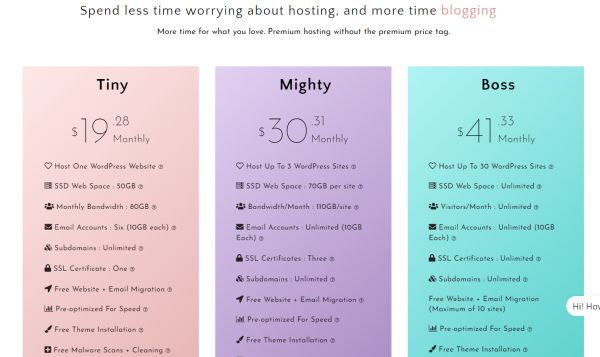
When you’re just getting started, it may not matter a whole lot where you put your blog, so it’s fine to sign up with a cheapie service like Bluehost or Hostgator. Those are also fine for a portfolio site if you’re a freelancer. As you start building up traffic though, you’re going to want something more professional, with better speed and real people who will help you solve problems that crop up.
I’ve been through plenty of hosting companies over the years and I still have a few low-traffic sites on Siteground. They’re a bit overpriced if you just have one, but for several it’s not too bad. They have some good times for bringing down your page loading time, including their own CDN if you don’t want to mess with Cloudflare.
I’ve followed recommendations from bloggers with more traffic than me the past few years though and have moved my most important blogs to two hosts: LyricalHost and PeoplesHost. Both have far better customer service than I’ve experienced in the past and the server response time is good on the technical side. (In other words, if I’m not passing Core Web Vitals, it’s probably not their fault, but something else.)
If you’re getting more than 100K monthly page views, you should probably upgrade to a plan with a “dedicated server” that’s all yours, something robust that can handle it if you get a big viral spike.
How about you? What tools for bloggers do you gladly pay for, either monthly or annually?
This post on blogger tools that pay for themselves was updated in 2025.
About Author

Tim
Tim Leffel is the author of Travel Writing 2.0 as well as several other successful books. His work has been recognized by SATW, NATJA, and the Solas Awards. He has contributed to more than 50 publications as a freelancer and is the editor of four websites and blogs, including the "Best online travel magazine" and the popular Cheapest Destinations Blog, established in 2003. He served six years as Conference Director for TBEX and five years as co-chair of the NATJA Advisory board.
I use BigScoots for hosting and do pay up for ahrefs, though I’m starting to feel like it’s making my blog posts sound too much like everyone else’s that are already out there. It seems like that’s not a good thing in light of where Google is headed with its latest update.